
How to Automate Guest Communication for Short-Term Rentals: A Step-by-Step Guide (2026)
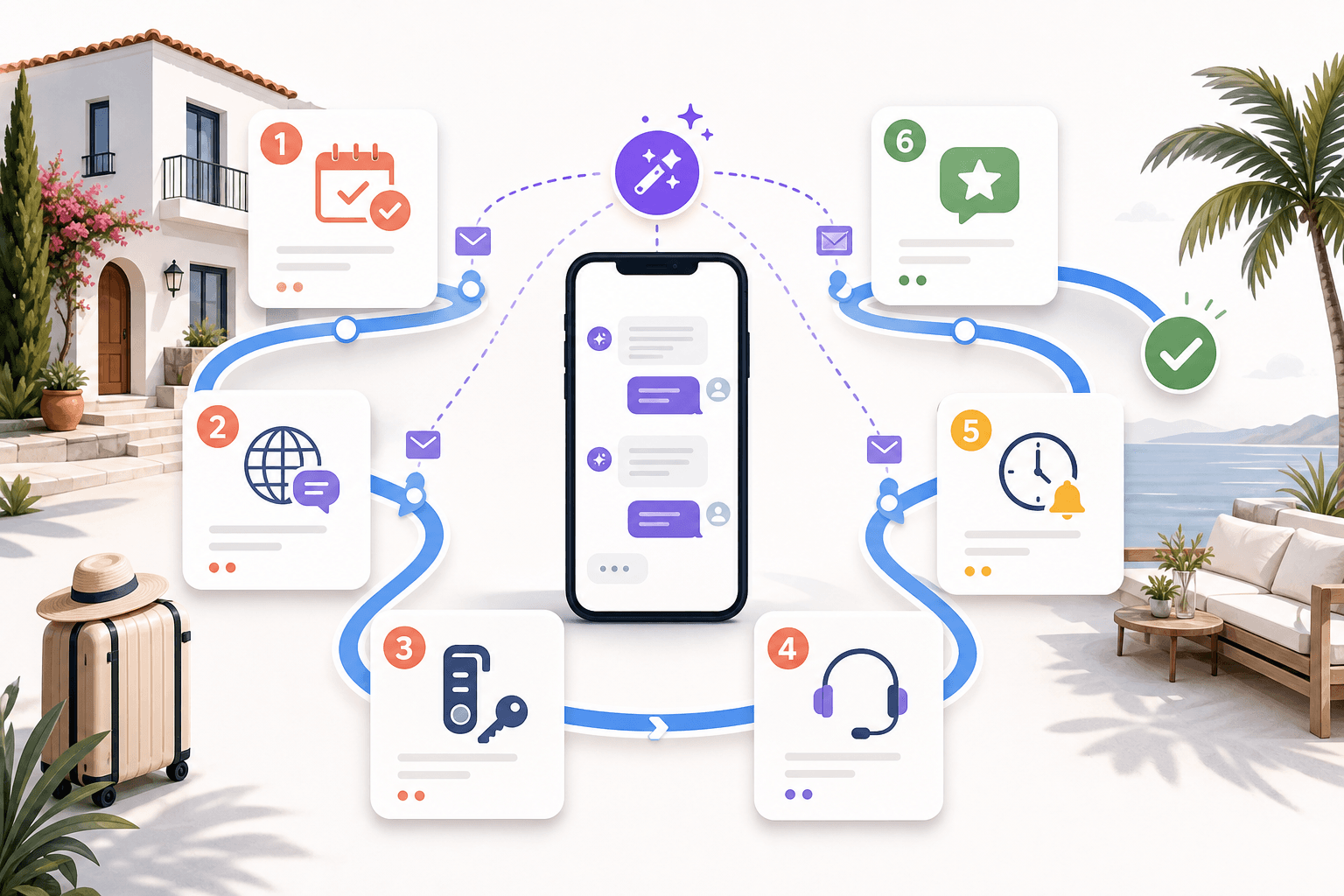
Automating short-term rental guest communication means setting up software that sends the right message at the right moment — booking confirmations, check-in instructions, checkout reminders, and review requests — without you typing each one. You map every guest touchpoint, write reusable templates, connect your channels to one inbox, and add timing and handoff rules so hosts save hours while guests still feel personally looked after.
Manual messaging works when you have one or two listings. Past that, the same 20 questions arrive at all hours across WhatsApp, Airbnb, Booking.com, and email, and response time — the metric that most affects rankings and reviews — starts to slip. This guide walks through the exact system: why it matters, the full trigger map, an eight-step setup, copy-paste templates you can use today, the tool landscape, and how to measure whether it's working.
Why automate guest communication
Automating guest communication protects your response time, review scores, and sanity as you scale. Guests expect near-instant replies at every hour; a solo host cannot answer a 2 a.m. Wi-Fi question in five minutes, but an automation can. Automation also standardizes quality, so every guest gets the same complete check-in instructions regardless of how busy you are.
The business case is concrete. On most OTAs, fast, consistent replies feed directly into search ranking and Superhost-style status, while missing details drive avoidable messages and one-star surprises. When routine questions — Wi-Fi, parking, check-in time, checkout steps — are answered before they're asked, your message volume drops and the conversations that remain are the ones that actually need a human.
What automation should and shouldn't do
Automation should handle the predictable and escalate the exceptional. Roughly 70-80% of guest messages are repetitive logistics that a well-built template library answers instantly. The remaining fraction — refund disputes, medical issues, angry guests, unusual requests — needs a human, and a good system routes those to you fast instead of burying them.
The goal is not to remove the human. It's to remove the repetition so your attention lands where it matters. Over-automating — sending robotic, poorly timed, or irrelevant messages — damages trust faster than slow replies. The best setups feel personal precisely because the host isn't drowning in copy-paste work.
The message-trigger map (booking → pre-arrival → check-in → during stay → checkout → review)
A message-trigger map is the blueprint of every automated touchpoint across the guest lifecycle, from the moment a booking confirms to the review request after checkout. Building it first — before you touch any software — ensures you cover every expected contact point and never leave a guest wondering. Each stage below has a clear job and a natural send window.
| Stage | Trigger | Timing | Message job |
|---|---|---|---|
| Booking | Reservation confirmed | Immediately | Confirm details, set tone, promise what's next |
| Pre-arrival | Days before check-in | 3-5 days prior | Collect info, share directions, upsells |
| Check-in day | Check-in date | Morning of / 2-3 hrs before | Access codes, Wi-Fi, house guide |
| During stay | Mid-stay checkpoint | Night 1 or midpoint | Confirm all is well, offer help |
| Checkout | Checkout date | Evening before / morning of | Checkout steps, time, departure tasks |
| Post-stay | After checkout | 1-3 hrs after | Thank-you + review request |
Booking and pre-arrival
The booking confirmation and pre-arrival sequence set expectations and gather what you need before the guest arrives. The confirmation should land within seconds of a reservation, reassuring the guest and telling them when detailed instructions will follow. The pre-arrival message, sent three to five days out, collects arrival times and shares directions, parking, and optional upsells like early check-in.
Check-in, during stay, and checkout
The check-in, mid-stay, and checkout messages carry the operational load of the stay. Check-in day delivers access codes, Wi-Fi, and a house guide hours before arrival. A single mid-stay check-in on night one catches problems before they become bad reviews. The checkout message, sent the evening before, states the checkout time and departure tasks so cleaners aren't delayed.
Step-by-step: setting up automated guest messaging
Setting up automated guest messaging follows eight steps: map touchpoints, unify channels, write templates, set timing, add logic, insert a human handoff, test, and launch. Work through them in order — each depends on the one before it. The whole build takes a focused afternoon for a small portfolio and pays back the first week.
Step 1: Map every guest touchpoint
Start by listing every moment a guest expects to hear from you, using the trigger map above as your baseline. Add anything specific to your property — a pool-safety note, a quiet-hours reminder, a local-recommendations message. Write each one as a row: trigger, timing, and the job the message does. This map is your source of truth for everything that follows.
Step 2: Connect your channels to one inbox
Route every channel — WhatsApp, SMS, email, Airbnb, Booking.com, Vrbo, Instagram — into a single unified inbox. This matters because guests message wherever they booked, and automations must fire regardless of channel. A unified inbox also means your team sees one thread per guest instead of hunting across five apps. SympleHost's multi-channel inbox consolidates WhatsApp, Instagram, Facebook, and OTA threads into one view.
Step 3: Write templates for each trigger
Draft one reusable template per touchpoint, using merge fields — {{guest_first_name}}, {{property_name}}, {{check_in_time}}, {{wifi_password}} — instead of hardcoded text. Keep each message short, warm, and skimmable. Copy the templates in the next section as a starting point, then adjust the voice to match your brand. Store them where your tool can attach them to triggers.
Step 4: Set the timing rules
Assign each template a send condition tied to the reservation dates, not fixed calendar times. For example: booking confirmation fires immediately on reservation, check-in instructions fire three hours before check-in, and the review request fires two hours after checkout. Timing relative to each booking is what makes the same template feel personal across hundreds of stays.
Step 5: Add conditional logic and personalization
Layer rules so guests receive relevant messages, not generic blasts. Send in the guest's language, vary content by length of stay (a two-night guest doesn't need a mid-stay laundry note), and branch by listing so the beach condo's parking message differs from the downtown loft's. An AI guest concierge can answer free-text questions that fall outside your fixed templates, drafting replies from your listing details.
Step 6: Insert a human-handoff rule
Define exactly when automation should stop and alert you. Trigger a handoff on keywords like "refund," "broken," "emergency," "cancel," or "unhappy," and on any message the AI can't answer confidently. This safety valve is non-negotiable — it's what keeps automation from making a bad situation worse when a guest is frustrated or something has genuinely gone wrong.
Step 7: Test with a dummy reservation
Create a test booking and walk the entire timeline before any real guest sees it. Confirm each message fires at the right moment, merge fields populate correctly (no stray {{guest_first_name}} in the live text), links work, and the handoff rule actually pings you. Testing catches the embarrassing errors — wrong Wi-Fi password, doubled messages — that erode trust instantly.
Step 8: Launch, monitor, and refine
Go live, then treat the system as a living thing. Each week, review which questions still reach you (those are missing templates), which messages get replies or complaints, and where response time lags. Prune anything redundant, reword anything unclear, and add templates for recurring questions. A guest-communication system is never "done" — it compounds as you tune it.
Copy-paste message templates
These templates are ready to use — swap the merge fields for your tool's syntax and adjust the voice. They cover the full lifecycle and are deliberately concise; guests skim on their phones. Keep one warm sentence of personality at the top and put logistics in scannable lines below.
Booking confirmation (send immediately)
Hi {{guest_first_name}}, thanks for booking {{property_name}}! 🎉 Your stay is confirmed for {{check_in_date}} to {{check_out_date}}. I'll send full check-in details a few days before you arrive. Anything you need in the meantime, just reply here — I'm happy to help.
Pre-arrival (send 3-5 days before check-in)
Hi {{guest_first_name}}, we're looking forward to hosting you at {{property_name}} on {{check_in_date}}! Two quick things: (1) What time do you expect to arrive? (2) Parking is {{parking_note}}. I'll send door codes and Wi-Fi the morning of check-in. Want early check-in? Reply and I'll see what's possible.
Check-in day (send 2-3 hours before check-in)
Hi {{guest_first_name}}, your {{property_name}} is ready! 🔑 Address: {{full_address}} Door code: {{door_code}} Wi-Fi: {{wifi_network}} / {{wifi_password}} Check-in guide: {{guide_link}} Message me anytime — enjoy your stay!
Mid-stay check-in (send night 1 or at midpoint)
Hi {{guest_first_name}}, hope you're settling in well at {{property_name}}! Everything working as expected? If anything needs attention, just reply and I'll sort it out right away.
Checkout reminder (send evening before checkout)
Hi {{guest_first_name}}, checkout is at {{check_out_time}} tomorrow. Before you go: {{checkout_tasks}}. To lock up: {{lockup_instructions}}. It's been a pleasure hosting you!
Post-stay review request (send 1-3 hours after checkout)
Hi {{guest_first_name}}, thank you for staying at {{property_name}} — it was great having you! If you enjoyed your stay, a quick review really helps us: {{review_link}}. Hope to host you again soon. 🙏
Tools that automate guest communication
The tools that automate guest communication range from all-in-one property management systems to messaging-only apps and AI answer layers. Which fits depends on portfolio size, channels, and whether you want automation bundled with pricing, operations, and channel management or as a standalone add-on. The table below frames the categories honestly; for a detailed head-to-head, see our dedicated comparison.
| Category | Best for | Not for | Examples |
|---|---|---|---|
| All-in-one PMS with messaging | Operators wanting inbox, pricing, and ops in one place | Hosts who only need messaging and nothing else | SympleHost, Guesty, Hostaway, Hospitable |
| Messaging-focused tools | Hosts happy with their PMS but needing better automation | Teams wanting consolidated operations | Enso Connect, Hostfully |
| AI answer layers | Adding AI replies on top of an existing stack | Hosts without an existing inbox to layer onto | Besty AI |
For a full feature-and-price comparison of the leading options, read our roundup: Best automated guest communication software for vacation rentals.
Where SympleHost fits
SympleHost is an all-in-one AI property management platform that bundles guest communication with pricing, operations, and channel management. Its AI Guest Concierge answers free-text questions in nine languages, the multi-channel inbox unifies WhatsApp, Instagram, Facebook, and OTA threads, and it connects to a dynamic pricing engine and operations automation so a guest's checkout message can trigger the cleaning task automatically.
Pricing is per listing per month with graduated volume discounts: Basic starts at $15/listing/mo and Pro at $20/listing/mo (USD), with regional pricing in INR (Basic ₹599, Pro ₹799) and IDR (Basic Rp240k, Pro Rp280k). Discounts step up by band — 3% off at 11-20 listings, 6% at 21-50, and 10% at 51+ — plus another 10% for yearly billing. There's a 14-day free trial.
Best for: operators who want messaging automation wired into pricing and operations rather than bolted on. Not for: a single-listing host who only wants a canned-reply tool and nothing else.
How to measure impact
Measure the impact of guest-communication automation with five metrics: median first-response time, message volume per reservation, review score and rating velocity, mid-stay issue catch rate, and the share of conversations resolved without a human. Track them for a month before automating to set a baseline, then compare monthly. Gains show as faster replies, fewer manual messages, and steady reviews.
| Metric | What it tells you | Direction of success |
|---|---|---|
| Median first-response time | How fast guests get an answer | Down |
| Messages handled per reservation (manual) | How much repetitive work remains | Down |
| Automated-resolution rate | Share of questions solved without you | Up |
| Review score & rating velocity | Whether guest experience holds up | Steady or up |
| Mid-stay issue catch rate | Problems fixed before checkout | Up |
Watch for the failure mode: automated-resolution rate climbing while review scores fall usually means messages are firing but landing badly — wrong timing, robotic tone, or missing personalization. If that happens, pull back on volume and invest in better templates and handoff rules. The analytics view in your platform should surface response times and message volume so you're tuning on data, not hunches.
Frequently asked questions
Will automated messages make my guests feel like they're talking to a robot?
Not if they're built well. The trick is personalization through merge fields, timing tied to each reservation, and a human-handoff rule for anything sensitive. Guests rarely notice that a Wi-Fi message was automated — they notice that it arrived exactly when they needed it. Robotic feelings come from bad timing and irrelevant content, not from automation itself.
How many messages should I automate versus send manually?
Automate the predictable logistics — booking confirmation, pre-arrival, check-in, mid-stay, checkout, and review request — which typically cover 70-80% of guest messages. Keep manual (or human-escalated) anything emotional, financial, or unusual: complaints, refunds, emergencies, and special requests. The right split removes repetition while keeping a person available for the moments that actually need judgment.
What's the single most important message to automate first?
The check-in instructions. It carries the highest-stakes information — access codes, Wi-Fi, address — and it's the message guests most often need right when you're least available. Automating it to fire a few hours before check-in guarantees every guest gets complete, consistent details and eliminates the most common source of last-minute panic messages.
Do I need separate tools for each booking channel?
No — and you actively shouldn't. Guests message wherever they booked (Airbnb, Booking.com, WhatsApp, email), so the goal is the opposite: a single unified inbox that pulls every channel into one place. That way one set of automations and templates works everywhere, and your team sees one conversation thread per guest instead of switching between apps.
How much does guest-communication automation cost?
It varies by tool and model. SympleHost prices per listing per month — Basic from $15/listing/mo and Pro from $20/listing/mo in USD, with regional INR and IDR pricing — and includes graduated volume discounts plus a 14-day free trial. Competitors price differently: some publish flat per-property rates (Hospitable from $29/month, Hostfully from $15/property/month), while others are quote-based (Hostaway; Guesty beyond its ~$9/listing/month entry tier). Compare on total cost across the features you'll actually use, and confirm current figures on each vendor's site.
Can automation handle guests who write in another language?
Yes, if your tool supports it. SympleHost's AI Guest Concierge responds in nine languages and the platform runs region-aware. For fixed templates, store a version per language and branch on the guest's detected language in your conditional-logic step. Multilingual support matters most for international OTAs where a guest's first language may not match your listing's.
The bottom line
Automating guest communication is the highest-leverage system a short-term rental operator can build: it protects response time, standardizes quality, and frees your attention for the conversations that genuinely need a human — turning the same effort that once handled two listings into a system that comfortably handles twenty. Map every touchpoint, unify your channels, write reusable templates, set reservation-relative timing, add a human-handoff rule, test with a dummy booking, then monitor and refine.
The tooling you choose matters less than the discipline of the system — but an all-in-one platform that wires messaging into pricing and operations removes the seams where manual work creeps back in. If you want to build this on SympleHost, with an AI concierge, a unified multi-channel inbox, and nine-language support, you can start a 14-day free trial.
Your co-host never sleeps. So you can.
Try SympleHost for 14 days — business email and card required, no setup fee, cancel anytime. Or have us set it up with you on a call.