
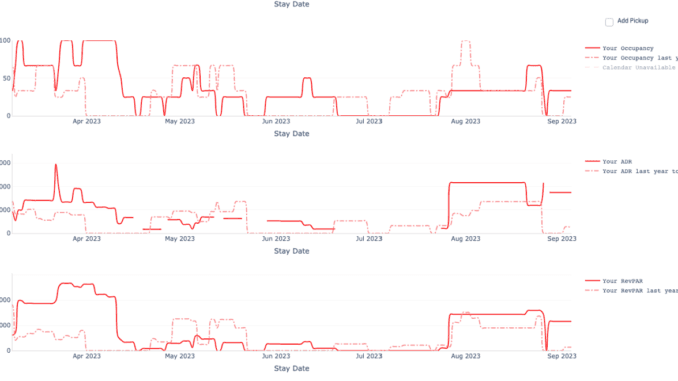
If you're still setting your nightly rates by hand across every property, you're almost certainly leaving money on the table. Plenty of operators still price manually or lean on a basic tool — and the ones who run real dynamic pricing tend to do better on RevPAR (revenue per available room).
Airbnb's smart pricing is a starting point, but most experienced hosts find it underprices their listings. A good dynamic pricing tool goes well beyond Airbnb's built-in algorithm, factoring in local events, competitor rates, booking velocity, and the seasonal demand specific to your micro-market.
Why Airbnb smart pricing falls short
Airbnb's native smart pricing optimizes for occupancy, not revenue. It tends to drop rates aggressively to fill nights, which works against you in premium markets — think Sedona, Queenstown, or a beachfront stretch of Tulum — where rate integrity matters.
More importantly, it only sees Airbnb. If you also list on Booking.com, Expedia, and Agoda, you need pricing that updates across every channel at once, not one platform in isolation.
The local-knowledge gap
Demand isn't generic, and pricing tools that ignore the local calendar miss real money. SXSW in Austin, ski season in Park City, Carnival in Rio, a festival weekend in Byron Bay — these create demand spikes a blunt algorithm won't catch. The same goes the other way: predictable quiet stretches where aggressive rate cuts just train guests to wait for a discount. Good dynamic pricing reads the local rhythm.
How dynamic pricing works
A capable pricing tool weighs several factors in real time:
Demand signals — booking velocity in your market, search-volume trends on OTAs, and flight data for your destination tell you demand is rising before it shows up in your calendar.
Competitor analysis — what similar properties in your micro-market are charging tonight, this weekend, and next month. This matters most in dense markets like Mexico City or Nashville, where guests comparison-shop hard.
Seasonality patterns — most markets don't follow a tidy high/low split. A ski town runs a sharp winter peak; a coastal city stays steadier year-round. Your pricing tool needs to understand your market's actual shape.
Channel-specific optimization — different OTAs carry different fee structures, so your net rate has to be set per channel. Good pricing automation adjusts rates channel by channel so your take-home stays consistent.
Measuring your pricing performance
Before you turn on dynamic pricing, establish your baseline metrics:
ADR (average daily rate) — your average nightly rate over a period. Track it monthly and compare year over year.
Occupancy rate — the share of available nights that are booked. Healthy occupancy varies widely by market and property type, so benchmark against comparable listings rather than a universal target.
RevPAR (revenue per available room) — ADR multiplied by occupancy rate. This is the single most important metric because it balances rate and occupancy. A $100 ADR at 60% occupancy ($60 RevPAR) beats $80 ADR at 70% occupancy ($56 RevPAR).
Booking lead time — how far ahead guests book. Lead times differ a lot by market and season, and the shorter yours runs, the more responsive your pricing needs to be to last-minute demand.
Setting up dynamic pricing for your portfolio
Start with your competitive set. Identify 8 to 12 comparable properties in your immediate area. Match on property type, amenities, location, and guest capacity. That becomes your benchmark. (We've written a full guide to building a competitive set.)
Set rate floors and ceilings. Never let automation price you below your minimum acceptable rate. For a premium beach house, that floor might be $250 a night even in the off-season. For a city apartment, it might be $80.
Review weekly, not daily. The point of pricing automation is to give you your time back. Check rates weekly to confirm the algorithm is performing, and resist the urge to override it every day.
Layer in promotions. Dynamic pricing handles rate optimization, but you should still run targeted promotions to past guests during slower stretches. Automated pricing plus manual outreach works better than either alone.
Choosing a dynamic pricing tool
When you compare pricing tools, weigh these factors:
Market coverage. Does the tool have enough data for your specific micro-markets? Pricing depends on local comps, so a tool that's thin in your area will give thin recommendations.
Channel integration depth. A good tool pushes rate changes to every channel at once — Airbnb, Booking.com, Expedia, Agoda — through API connections, not manual updates. Pricing that only works on one platform defeats the purpose.
Customization flexibility. Markets are diverse. You should be able to set market-specific rules: different minimum stays for weekends versus weekdays, event-based rate overrides for local holidays, and channel-by-channel adjustments.
Integration with the rest of your stack. Standalone tools create data silos. Pricing works better when it sits alongside your bookings, guest messaging, and operations — one set of data, one place to act on it.
That last point is why Symplehost runs its dynamic pricing on PriceLabs natively. You get a best-in-class pricing engine inside the same product that handles your inbox, your channels, and your calendar — one rule set, one bill, no second tool to learn.
The revenue impact
Operators who move from static to dynamic pricing often see a meaningful lift in RevPAR within the first few months — real money recovered without adding a single new listing.
As supply keeps growing in competitive markets, dynamic pricing has shifted from a nice-to-have to table stakes. The operators who adopt it early hold a real edge. If you want to go deeper on revenue management, our 2026 conference guide covers the events where these strategies get refined.
See how Symplehost's pricing tools help operators grow revenue
Your co-host never sleeps. So you can.
Try Symplehost free for 30 days. No card, no setup fee, no demo call.